2015年8月5日星期三

FM Systems - how do they work

A traditional FM System comprises of two main parts – a radio transmitter and radio receiver. The transmitter captures sound via a microphone or direct connection to a sound source and transmits to the receiver.
Transmitters and receivers vary dependent on the manufacturer. Some have manual controls only while others have manual controls with a small screen for menu selection to set the transmission frequency between the transmitter and receiver and select the use of the audio input. The screen may also show the battery level, frequency channel and direction of the microphone.
Contego receiver transmitter

Receivers

Receivers have different physical outlines, functions and methods of working with hearing aids or cochlear implants. One functional difference is that some receivers have an inbuilt microphone which depending on the situation can be used without the transmitter.
The different methods of receivers working with hearing aids or cochlear implants are:
  • Neckloop
The most common is the receiver with a Neckloop that is worn around the neck. The receiver feeds the transmission into the neckloop which is your own personal induction loop and the hearing aid(s) or cochlear implant processor is set to the “T” position. The telecoil, in the hearing aid or implant processor, picks up the magnetic field generated by the neckloop and the electronics in the hearing aid converts the magnetic field back to sound. The sound level received can be controlled by both the receiver and hearing aid/implant processor volume controls.
Contego with neckloop
  • Direct Audio Input FM Receiver 
If the hearing aid(s) or cochlear implant processor also have a Direct Audio Input a miniature receiver can be connected directly via an audio shoe (adaptor). The miniature receiver is powered by the hearing aid battery and the sound level received controlled by the hearing aid volume control. The “T” position is not used.
Direct audio input
  • Direct Audio Input lead
If the hearing aid(s) or cochlear implant processor have a Direct Audio Input the receiver can be connected by a connecting lead directly to the hearing aid via an audio shoe (adaptor) rather than using a neckloop. The cable is normally supplied by the hearing aid manufacturer. The sound level received can be controlled by both the receiver and hearing aid volume controls.
  • Inductive Earhooks
Earhooks can replace a neckloop though not as common, especially when wearing glasses. The combination of hearing aids, glasses and earhooks can be uncomfortable for people. The sound level received can be controlled by both the receiver and hearing aid volume controls.
People who do not wear hearing aids can use the neckloop receivers with headphones or earphones. Some manufacturer’s now have a receiver, with volume control, that attaches to the ear. A miniature speaker is positioned over the outside of the ear canal or in the ear canal.
Earset

Transmitters

Transmitters on the majority of equipment have an integral microphone, an audio input and frequency selection. As systems have developed, in particular those using digital transmission, there is a selection of transmitters for the user to select from to provide a solution for their individual lifestyle. There are microphones that pick up from greater distances with functions that give the user more control over the quality and clarity of sound they receive and others with features that include Bluetooth and a Transmitter Receiver. 
  • Bluetooth® connects the FM System to a Mobile Phone that also has Bluetooth®.
The caller’s speech is transmitted from the mobile to the FM Transmitter and from the FM Transmitter to the FM Receiver. The receiver’s speech is picked up by the microphone on the FM System and transmitted to the mobile.
  • The microphones usually have two or three positions
Omnidirectional – where the sound (speech) pick up is 360°
Directional
Directional with zoom
  • Audio Input - Line Input
Allows the transmitter to be connected to sound sources (TV, Radio, PC, MP3, Amplifiers etc.)
3.5mm stereo socket
  • Audio Input – Microphone Input
Allows an external microphone to be connected via the 3.5mm stereo socket
  • Frequency Selection
Dependent on the manufacturer some systems only have one transmission frequency
More than one frequency can be very useful as it provides you with the option to change to a different frequency if you are in a situation, where the sound you are receiving is noisy, possibly due to another person or organisation using the same frequency or one that is close.
  • Transmitter Receiver allows two microphones to be used to transmit simultaneously to receivers.
One microphone transmits to the other microphone, which contains a receiver, and this microphone transmits the sound from both microphones to the receivers.

Digisystem


Thanks to ihear for supplying the content on this page.
Images are shown courtesy of Comfort Audio AB.
Photos thanks to Phonak.

Home FM Transmitter Goes The Distance

Searching for a home FM transmitter?

Then paste your eyes to this blog post as I'll reveal the top home FM transmitter and my journey to find the one FM transmitter I could rely on to cover my house in my favorite Van Halen songs.

See...I didn't even know anything about home FM transmitters until I was complaining to my tech friends about lugging my laptop around my house whenever I wanted to listen to Eddie shred the guitar.

My friends explained to me that if I had an FM transmitter, I could listen to my music anywhere in my house I had an FM Radio.

This was news to me and I didn't really understand how it worked until I plugged it in for the first time. And as a newbie to this technology, I have to admit it was rather easy to set up.

I went out on a friends advice and purchased a HOME FM TRANSMITTER

It not only was monkey simple to set up, it also allowed me to play my music on the FM radios throughout the house. I have one in the basement when laundry duty calls and one in the bedroom and bathroom.

So...

Now I have my laptop located in my living room where it sits next to my stereo. And I don't have to move it anymore.

It's like I gave my music legs, it travels where I need it to travel.

If you want to make your music more mobile for your home or your car then you need one of these little gadgets called an FM transmitter.

It not only enhances your music, it also allows you more versatility in where you listen to your music.

How To Play Songs From Your USB Flash Drive On Your Car Stereo

Ever since USB was introduced to computers, it has been invading other computer and entertainment devices that had previously been untouchable. Most high definition TVs, for example, are now equipped with USB ports, giving the user the opportunity to play movies without a DVD or Blu-ray player or the option to incorporate the TV into his computer workstation. With such an influential effect in home entertainment, it didn’t take long for the USB interface to invade car interiors.
The extent of USB’s domination shows in the fact that some cars are now equipped with USB ports where you can plug in your flash drive and play the music stored in it. For those that don’t have a built-in USB port in their car, there’s still a way for you to enjoy music through your flash drive. All you need is a wireless FM transmitter with a USB port and a car with a cigarette lighter (not at all hard to find).
The first thing you need to do is get an FM transmitter. Whether you get it from a store or from a friend doesn’t really matter. Just make sure that it has the capacity to read USB flash drives. If you want to splurge or have a few more options, there are also FM transmitters out there that can play music through MP3 players and SD cards. Now that you have your FM transmitter, connect it to your car via the cigarette lighter, which is usually located near the bottom of the car’s center console.
Next, get the flash drive full of music and plug it into the transmitter’s USB port. Turn on the transmitter and set it to any FM station; there are usually hundreds of them. Once you have picked a station, wait for your flash drive to do its end of the work. Pretty soon, if not instantly, you’ll be hearing the music from your flash drive coming through the car speakers. Enjoy the fruits of your new DIY hack.
Having this kind of music setup for your car will cost you about $20, which is the average price wireless FM transmitters sell for. If you want some convenience, you can choose to pay up for a transmitter that’s bundled with a remote.
Comments are closed.

Click FM Transmitter

Having the mission of taking technology One Step Further, NEXTBASE always take lead to develop and enhance the products to meet every needs of our customers. NEXTBASE proudly introduces you two tailor-made accessories for Click series DVD players - FM Transmitter and External Battery.

Tiny and sophisticated, FM Transmitter is developed for generating and amplifying FM-frequency signals. The FM-transmitter plugs into the audio output of Click 7/9/10 and converts the audio output into an FM radio signal, which sounds can then be played from the car stereo system. NEXTBASE FM Transmitter integrates Click 7/9/10 OSD menu automatically and supports worldwide FM band from 76Mhz to 108Mhz. (may vary across countries).
Click & watch! With Click External Battery, you can now take Click 7 along and watch movies wherever you want because Click external battery provides Click 7 with 2.5hour playback time. Even without adapter and power supply, Click 7 can play movies, videos, music and photos. How convenient it is! What's more? It can also be recharged for more than 500 times.
Action now, and enjoy the value added products NEXTBASE provides!!

FM Transmitter

In my Technologist as a Professional course, our Thursday period is a lab period. This means: we get to build stuff. So far, we’ve had two projects, and we have a few more on the way. The first project was to build a fully functional, variable frequency, stereo FM transmitter.
FM Transmitter (angle shot)
It wasn’t particularly difficult, as it came in a kit with the circuit board, components and instructions, but as it was a first project, it wasn’t meant to be difficult, either. I managed to get it working on the first try. The kit was ordered from http://canakit.com, the kit in particular is at http://www.canakit.com/hi-fi-stereo-fm-transmitter-kit-ck222b-uk222b-ck222-uk222.html.
So far, as mentioned in the last post, I’ve tested the range to be roughly 2 to 2.5 houses using an MP3 player’s digital FM tuner, which naturally barely has an antennae. However, that still isn’t half bad! The two potentiometers lined up with the LED control the output volume, while the adjustable coil at the far end of the board in the picture controls the broadcast frequency. The website rates it’s frequency from 88 to 100MHz, however I can’t seem to get it much lower than 90MHz, but have no problems bringing it above 103MHz (I haven’t actually tested the whole range of it, yet, for fear of the core of the adjustable coil breaking, either coming out entirely or getting stuck down).
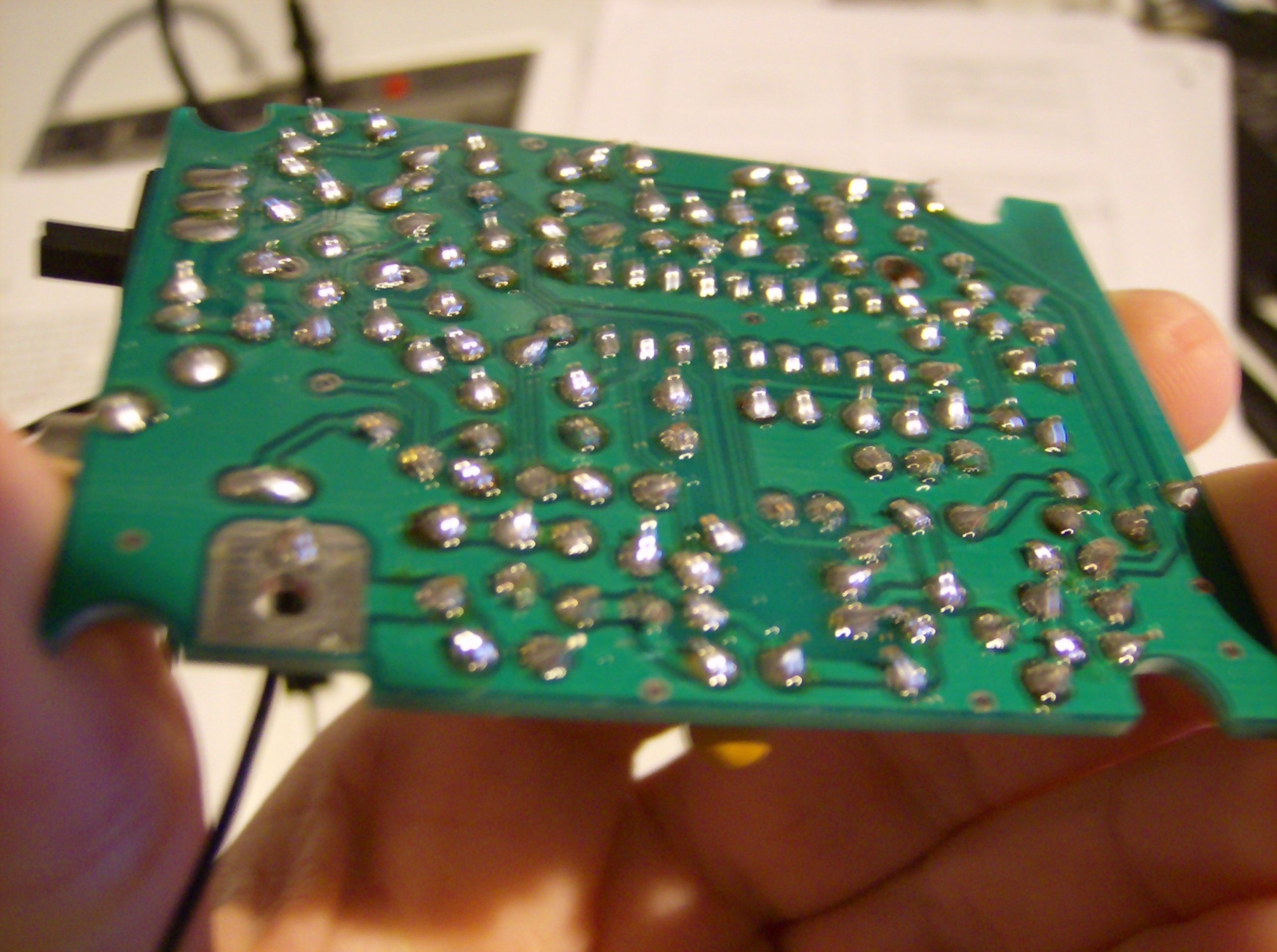
FM Transmitter (solder side)
How is the sound quality? Depending on the frequency, varies from fuzzy to quite clear. Bass is usually a little distorted on some channels, but on the right frequency the sound comes in sharp and clear. I’m sure properly trimming the antenna for the frequency used would help, but I don’t want to optimize it permanently for just one channel, yet.
Toolbox
As part of our school fees, we paid for a toolbox, a bright orange plastic one that if we try hard enough we can fit the breadboard, wire strippers, screw driver kit (so far I’ve broken two of them), wire cutters, pliers, component lead-bender and box of breadboard wires that came with it. If we try slightly harder, we can also fit in our projects, hehe. I was hoping to have pictures from within the classroom, but didn’t have my camera this morning. I’ll get some for the next post, which should have my detailing of the phone I assembled!

Build Your Own FM Transmitter and Send Your Music to Any Stereo

You can buy cheap FM transmitters for your iPhone from pretty much anywhere, but if you'd rather make your own little transmitter, Make shows you how to do it.
The basic idea here is that you can build a small FM transmitter for your MP3 player so you can send audio to pretty much any stereo. To do so, you'll just need a few off the shelf parts and a spare afternoon. Once you're done, you'll be able to amplify your transmitter so it can send your audio a little further, just make sure you don't accidentally break any laws when you do it. Sure, you can purchase one of these easily enough, but it's a solid project for helping you learn how they work so you can apply it elsewhere.

2015年8月4日星期二

SWR AND REFLECTED POWER

SWR METER SX600

You can have the biggest and the best FM transmitter in the world, but if the power doesn't get from it to the antenna you may as well turn it off. A transmitter is only as good as the antenna it is connected to. A poorly tuned antenna and antenna cable will send the power back to the transmitter and in worse case cause it to over heat resulting in permanent damage. It's a bit like driving a car with flat tyres, it will move slowly, but most of the power will be used in chewing the wheel rims to pieces. A well tuned antenna will take all the power put into it and radiated it all into free space. The antenna is effectively a transformer between the transmitters RF electrical current and free space.
The term SWR is used to measure the performance of an antenna. SWR is short for Standing Wave Ratio. An SWR of 1:1 indicates that the antenna is perfectly matched and there's no reflected power. At the other end of the scale an SWR of 1:Infinity indicates that no power is being absorbed by the antenna and all the transmitter power is being reflected back to the transmitter.
A useful piece of test equipment that measures SWR is an SWR meter. All serious radio stations should have one of these. This connects in line between the transmitter and the antenna and antenna cable. SWR meters have a switch on them usually labeled up as FWD and REF. In the FWD position the meter indicates the forward power traveling on the antenna cable, this is the power going from the transmitter to the antenna. In the REF position the meter indicates the reflected power traveling on the antenna cable, this is the power that has not been absorbed by the antenna returning back to the transmitter. To make an SWR reading the transmitter is switched on, the meter is set to FWD position and the CAL control is turned to make the meter needle point to 100%. The SWR meter is then set to REF position, the reading shown on the meter is the amount of reflected power relative to the forward power.
Significance of the SWR reading.
An SWR of 1:1.0 or sometimes just referred to as 1.0 indicates that all power from the transmitter is being absorbed by the antenna.
An SWR of 1.5 indicates that virtually all the power is being absorbed by the antenna. The power being reflected back is only a very small amount is not anything to worry about.
An SWR of 1.8 is starting to get a little bit over the ideal, however most transmitters will run happily at this. Also some broadband type antennas will have SWR of up to 1.8 at the far ends of their tuning range, this is acceptable.
An SWR of 2.0 is starting to get a bit too high. However, even at this level most transmitters will run without a problem. If you are using high power (100W and over) at this SWR it is time to service and adjust your antenna system to get the SWR to 1.5 or less.
An SWR of 2.5 or over is too high and some transmitters will be damaged at this level. It's advisable not to use a transmitter at this level of SWR.